
Forecast Fixed-Price Revenue in Salesforce — Without Relying on Resource Plans
The Planner adds a simple monthly phasing layer to Salesforce + Certinia, so you can forecast milestone revenue and billing accurately — without depending on fragile resource schedules.
Fixed-Price Forecasting Shouldn’t Be This Hard
If you deliver fixed-price or milestone-based projects in Certinia, you’ve probably experienced this:
Resource plans drift out of date
PMs don’t have time to constantly reschedule
Revenue forecasts swing wildly when staffing changes
Finance questions operations
Operations blames the system
And every month… someone rebuilds the forecast in Excel
PSA tools forecast beautifully when revenue = hours × rate.
Fixed-price projects don’t work that way.
You’re Asking One System to Do Two Different Jobs
Capacity Planning
Who is working? When?
Revenue Forecasting
When is value earned?
These are not the same thing.
When revenue forecasting depends on perfectly maintained resource plans, your forecast becomes fragile.
- Staffing changes distort revenue.
- Schedules become accounting inputs.
- Forecast volatility becomes normal.
Capacity Planning
Who works?
Driven by hours
Operational
Revenue Forecasting
When is Value earned?
Driven by milestone progress
Financial
The Planner Separates Revenue from Resource Schedules
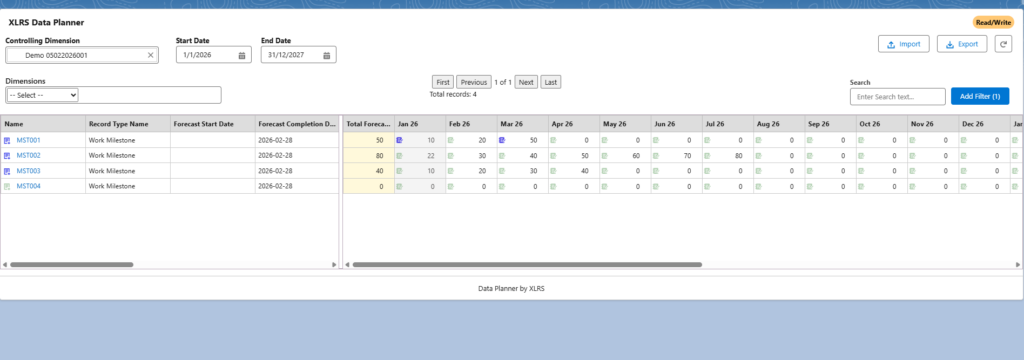
The Planner adds a lightweight forecasting layer inside Salesforce + Certinia.
Project leaders phase milestone progress monthly.
The system handles the revenue math.
No Gantt gymnastics.
No Excel side models.
No artificial revenue swings.
What Project Leaders Do
Enter percentage progression across upcoming months.
Example:
30% this month
55% next month
80% the following
100% at completion
What the Business Gets
Stable revenue forecasts
Clean monthly forecast records
Report-ready data
Optional revenue recognition integration
See it inside Salesforce
If you’re running fixed-price projects in Certinia, this will feel immediately familiar.
What Changes After Implementation
1. Forecast Stability
Stop seeing revenue spike because someone added a resource.
2. Faster Forecast Cycles
Update next quarter’s forecast in minutes — not Excel workshops.
3. Clean Monthly Forecast Data
The Planner creates a structured Milestone × Period data behind the scenes.
4. Less Forecast Friction
- PMO forecasts revenue.
- Finance trusts the numbers.
- Leadership gets clarity.
Built for Certinia PSA Customers Who Deliver Fixed-Price Work
Salesforce + Certinia environments
Milestone-based or unit-based contracts
Projects running 6–24 months
Quarterly revenue forecasting requirements
PMO or Delivery Ops responsible for operational forecasts
Especially powerful if you’re still exporting forecasting data to Excel.
Implementation Overview
Step 1.
Install the Planner package in Salesforce.
Step 2.
Map to your milestone or deliverable objects.
Step 3.
Enable monthly phasing by project leaders.
Step 4.
Report on forecasted revenue or billing — directly in Salesforce.
Typical implementation effort: approximately 60–80 hours depending on configuration complexity.
This Is Not Another Dashboard Project
Not a visualisation tool
Not an analytics overlay
Not a replacement for resource planning
Not a reporting workaround
It’s the missing planning object that makes fixed-price forecasting work.
Stop Letting Resource Plans Control Your Revenue Forecast
If you deliver fixed-price projects in Certinia and still rely on Excel to forecast revenue, it’s time to separate planning from scheduling.
FAQ - Frequently Asked Questions
Does this replace Certinia forecasting?
There is no function in Certinia that provides the same capability and that’s why The XLRS PSA Planner is complementary to Certinia’s forcasting.
Will auditors accept this method?
We have a number of customers using the XLRS PSA Planner today, and this method of forecasting is more reliable and defensible than the other manual spreadsheet methods tried before. So a systematic approach to forecasting Project revenue is bound to get a better reception from your Auditors than the variety of spreadsheet driven methods we have seen.
Can it drive revenue recognition?
In a word – Yes. The information captured in the XLRS PSA Planner is rich in context and value which means it is absolutely ready to drive revenue recognition. You can opt to use a revenue recongition engine of your choice or use the XLRS Revenue Recognition solution to accompany the XLRS PSA Planner. The end-to -end solution from Exceleris.
How long does implementation take?
Implementation is a straight-forward process and you may have some specific requirements you want to include in what the XLRS PSA Planner can do for you. We will work with you to validate that the XLRS PSA Planner is right for you with an initial Discovery. The Package will be installed and configured to align to what we agree in the Discovery session. We’ll work as quickly as you can.
